DYMO ID Help
Touring the Data Grid
The data grid is available for most label editors where you can import data or map data to the objects on the label. For complete information about using the data grid, see About the Data Grid.
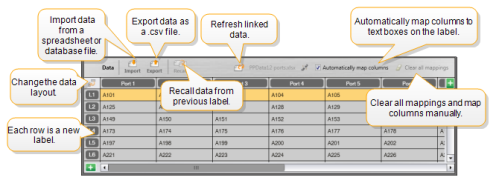
The data grid has the following features:
 Import Import |
Import data from a spreadsheet or database file. See Importing Data. |
 Export Export |
Export data as a .csv file. See Exporting Data. |
 Recall Recall |
Populate the data grid with data from the previous label. See Recalling Data. |
 Change data Change data |
Change the data layout. See Changing the Data Layout. |
 Refresh data Refresh data |
Refresh the data in the data grid from the linked source file. |
| Automatically map columns | When you import data into a multi-cell label and the columns match the number of cells on the label, the imported data is automatically mapped to the text box in each cell. You can map the data manually by deselecting the check box and then dragging columns to text or barcode objects on the label. |
| Clear all mappings | Clears all data mappings to objects in the label preview. |
 Add Add |
Add a column or row to the data grid. |
 Delete Delete |
Delete a column or row from the data grid. |
See Also
Was this topic helpful? Send us your feedback

©2015-2026 Sanford, L.P.
Revised: 09/2026