DYMO ID Help
Touring the Home Screen
The Home screen is the main interface for DYMO ID.
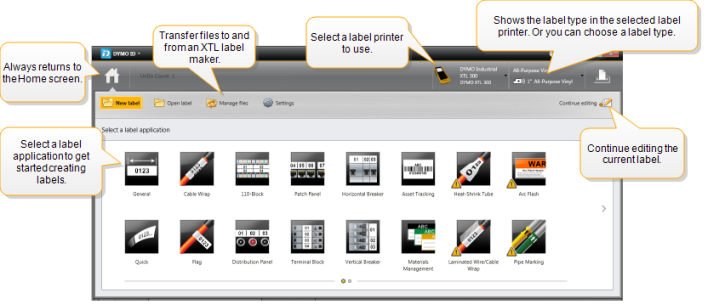
The Home screen contains the following features:

|
Returns you to the Home screen from anywhere in the software. When you return to the Home screen while editing a label, your editing session is still active. |
 New label New label |
Displays all the label applications for you to choose from to begin creating labels. A caution symbol |
 Open label Open label
|
Open a previously saved label file. |
 Manage files Manage files |
Transfer label files or images to your XTL label maker. Update and transfer templates to your XTL label maker. |
 Settings Settings |
Change general, print, and label application settings. |
 Continue editing Continue editing |
Continue editing the label you were working on before returning to the Home screen. |

|
Select a label printer to design and print labels. |

|
Select a label type for designing labels. |
 appears when a label application and the selected label printer or label type are not a match.
Related Topics
Was this topic helpful? Send us your feedback

©2015-2026 Sanford, L.P.
Revised: 09/2026