DYMO ID Help
Working with Objects
Labels are created using several different objects:
|
|
|
|
|


|
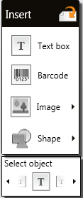
The label applications are pre-populated with at least one design object (usually a text box) to get you started creating your label quickly. You insert objects from the Insert toolbar by dragging an object to the label or by selecting the object on the toolbar. When multiple objects are present on a label, the Select object tool appears below the toolbar.
|
|
Objects can be:
Related Topics
Was this topic helpful? Send us your feedback

©2015-2026 Sanford, L.P.
Revised: 09/2026