DYMO ID Help
Deleting an Object
To delete an object from the label
-
Select the object.
A blue outline and handles appears when the object is selected.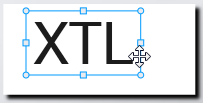
- For text boxes, click anywhere along the blue outline.
-
Do one of the following:
- Press Delete on the keyboard.
- Click
 .
. - Right-click and select Cut.
See Also
Was this topic helpful? Send us your feedback

©2015-2026 Sanford, L.P.
Revised: 09/2026