DYMO ID Help
Mapping Data
Map data to the label by dragging a column heading from the data grid to a text box or barcode object on the label. You can position the data before or after other text already on the label. You can also drag more than one column to different locations on the label.
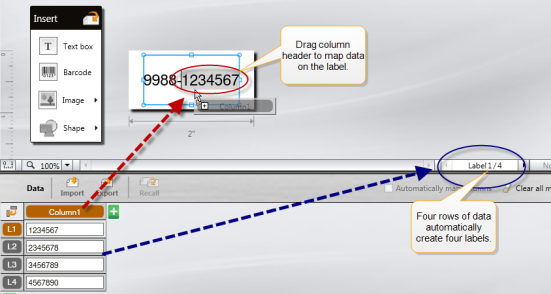
Multiple labels are automatically created based on the number of rows in the data grid.
To map data to a text box
- Select the column heading in the data grid.
-
Drag the column heading to the position in the text box where you want the data to appear.
To map data to a barcode
- Add a barcode object to the label.
-
Drag a column heading to the barcode object.
The data in each row automatically populates the barcode data field.
See Also
Was this topic helpful? Send us your feedback

©2015-2026 Sanford, L.P.
Revised: 09/2026