DYMO ID Help
Creating a Vertical Label
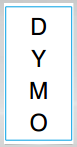
This topic describes how to create a vertically oriented General label for applications such as a binder spine, or other vertical surface.
- Always set the orientation of the label first. Changing the orientation will remove all data from the label leaving you with a blank label.
To create a vertical label
- Click
 , and then click
  General.
 - Under Orientation, select Portrait.
- Type some text into the text box on the label.
-
Under Rotation on the Text Formatting toolbar, select
 .
.The text should now be oriented vertically on the label.
See Also
Was this topic helpful? Send us your feedback

©2015-2026 Sanford, L.P.
Revised: 09/2026