DYMO ID Help
Selecting a Label Printer
All the label printers that are installed on your computer are displayed in the printer list under several categories:
- XTL 300
- XTL 500
- LabelWriter 4XL
- Rhino 6000+
- Office printer
If you have more than one label printer in a category, the printers are listed under each category.
 Show me...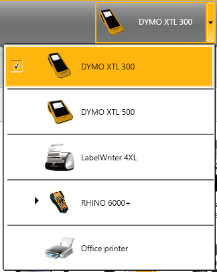
If you have more than one label printer installed on your computer, you need to select the appropriate label printer before printing.
For more information on the possible states of an XTL label maker, see Viewing the Status of Your XTL Label Maker.
- Each time you select an XTL label maker, you will be notified if updated software is available for that label maker. See Updating the Software.
To select a label printer
-
From the Home screen, click
 .
. -
Select the printer you want to use.
The selected printer is displayed on the Home screen. If you selected an XTL label maker, the label cartridge that is currently inserted is shown as well.
See Also
Viewing the Status of Your XTL Label Maker
Was this topic helpful? Send us your feedback

©2015-2026 Sanford, L.P.
Revised: 09/2026