DYMO ID Help
 Using Favorites
A quick way to access label files and images you use frequently is to assign them to Favorites.
Favorite images will always be displayed at the top of the image selection list.
To make a label file a favorite
- Create or open the label file you want to be a favorite.
- Save the file, if it is a new file and not already saved.
- Click
 to mark the file as a favorite.
To make an image a favorite
- Select Image from the Insert toolbar.
- Locate the image that you want to make a favorite.
-
Click the star in the upper left corner of the image.
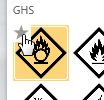
The star turns yellow and the image now appears under the Favorites category at the top of the image list.
To delete a favorite
- Click associated with a favorite label file or image to deselect it as a favorite.
See Also
Was this topic helpful? Send us your feedback

©2015-2026 Sanford, L.P.
Revised: 09/2026